Documentation How-to Guides
Navigating the ember app
A high-level tour of our app and how to navigate.
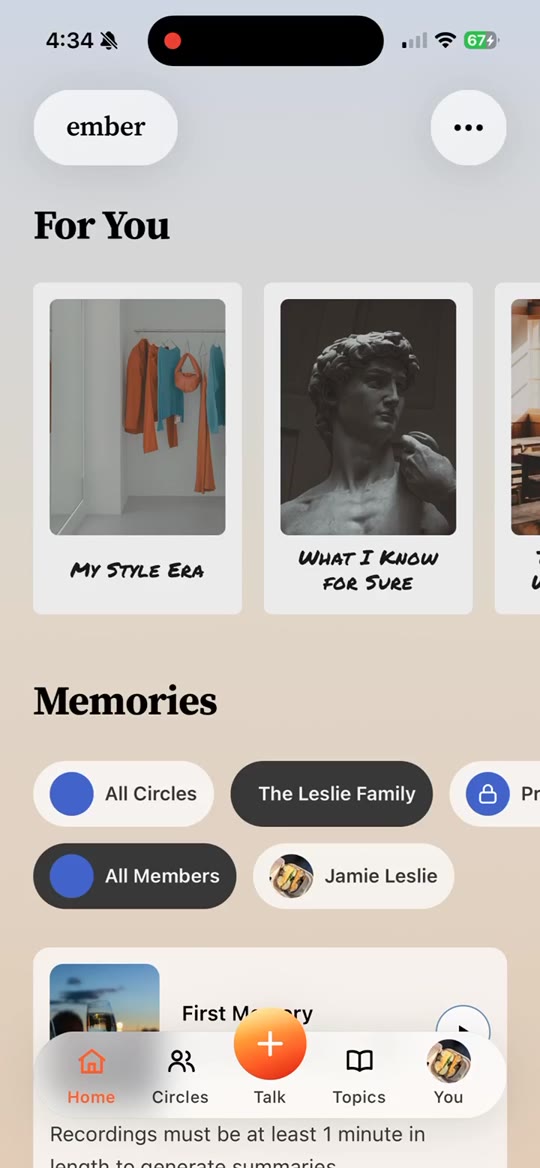
This guide shows you a high level overview of how to navigate to different parts of our app. This is just meant to familiarize yourself with high level navigation. For more specific guides on each section, check out the guide specific to each section.
- The first, Talk is where you can go start recording a memory. If you click it, you’ll see some cards that you can swipe left to right on. These are invitations from yourself, or other people, to share a memory. Think of Talk as your inbox. There’s a separate how to guide just focused on all the things you can do with Talk.
- The second, Memory Archives is where you can view, listen to, and manage all of your memories, as well as the memories of those in your family and circles. You’ll see completed memories appearing cards and you can browse by swiping up or down. You can swipe left and right to browse memories of others in your family or circles. Think of Memory Archives as your museum gallery. There’s a separate how to guide just focused on all the things you can do from Memory Archives.
- The third, Topics to Talk About is where you can browse and discover topics that you can record a memory about. You can also find our collection of how to guides here in the first row. We organize Topics to Talk About by theme, as well as by Era, since some topics are about specific time periods in your life. Topics to Talk About looks a lot like browsing Netflix. You can swipe up, down, left, or right to explore and click into any that interest you. There’s a separate how to guide just focused on all the things you can do from Topics to Talk About.
- The fourth, People, is where you can manage your personal profile settings, invite people to your family & circles, and manage your billing. People is similar to a “Settings” experience in a lot of other apps. You can change your language, update your profile picture, and lots of other things. There’s a separate how to guide just focused on all the things you can do from People.
Finally, a few other tips on navigation:
- If you get lost, look for the ember icon in the top left of a page. clicking that will take you back home.
- To quickly access your settings, look for your avatar icon in the top right of a page. clicking that will take you to your profile settings.
- To log out, click your profile icon in the top right and look for a logout card.