Creating a Story from Memories
Learn how to create and share stories from recorded memories.
This guide covers how to create Stories from your recorded memories.
One of Ember's best features is that you can casually talk about a memory, have a full transcript and summary generated, and then create beautiful, meaningful written content from that conversation.
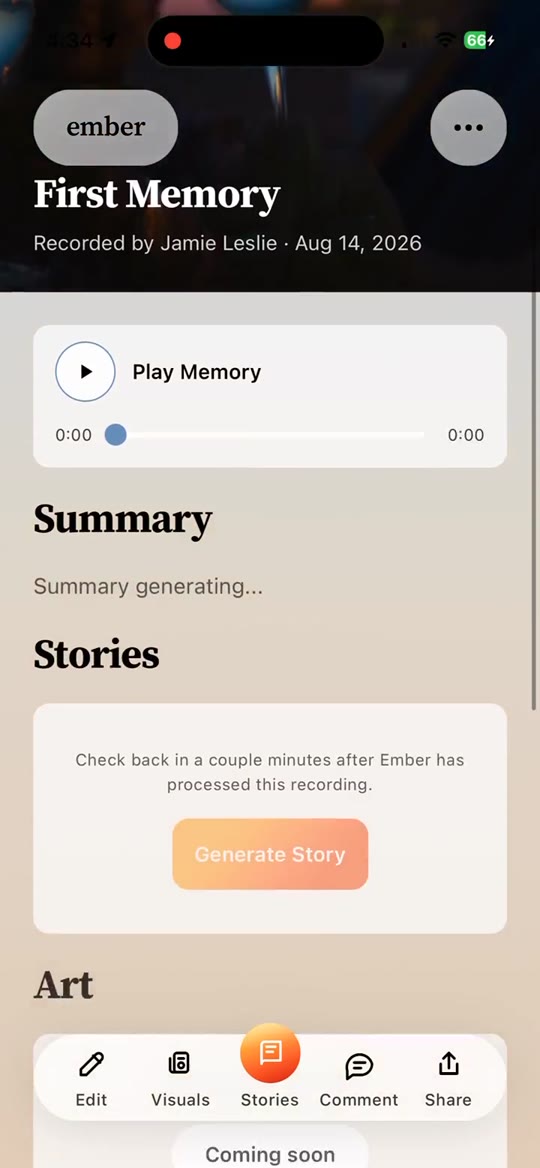
To get started, click into a memory card from Memory Archives. This takes you to the Memory Studio, where you can listen to the audio, add photos, and generate stories.
In the Memory Studio, look for the Stories section. You can swipe left or right to see different styles and, in some cases, languages available for story generation. Not all languages are available yet, but more styles and languages will be added over time.
If you see an orange button that says Generate Story, click it and Ember will generate a draft for you. This can take up to a few minutes for very long conversations, but usually finishes quickly.
Once the Story is generated, click the card again to view it. You can edit, refine, and save it. When it's ready, you can keep it private in the app. If you want to share it, press the Share / Publish button and Ember will generate a public URL you can send to anyone.
If you want to edit a Story after publishing, just make your edits and republish - the same link will update with the newer version.
If you're a writer and want your story featured in Ember's featured stories section, you can request an editorial review. If we love it, we'll publish and feature your story.